
⚡ DebunkTheAI Battle Report · Survey Tools · 2026
A team ran a single post-purchase survey after a product launch — the kind that typically sees a few hundred responses. Three weeks later, a $1,500 charge appeared on the company card with no prior warning, no approval step, and no way to reverse it. That’s the overage model that SurveyMonkey quietly relies on: you build your workflows around their tool, then they charge you for succeeding.
7 SurveyMonkey Alternatives 2026: Honest Battle Report After 40+ Hours of Research
SurveyMonkey is the category incumbent — $750M in annual revenue, 335M+ respondent panel, deep analytics. But its pricing architecture is designed to punish growth: $0.15 per overage response (auto-billed, no warning), compliance features locked behind $15K–$30K/yr Enterprise plans, and no bulk data export. For most teams, a well-matched alternative cuts spend by 40–70% without sacrificing capability. Our top picks: Jotform (best all-rounder), Tally (best free tier), SurveySparrow (best for recurring NPS programs).
Evaluate SurveyMonkey’s current plans before comparing:
→ Visit SurveyMonkey Official Site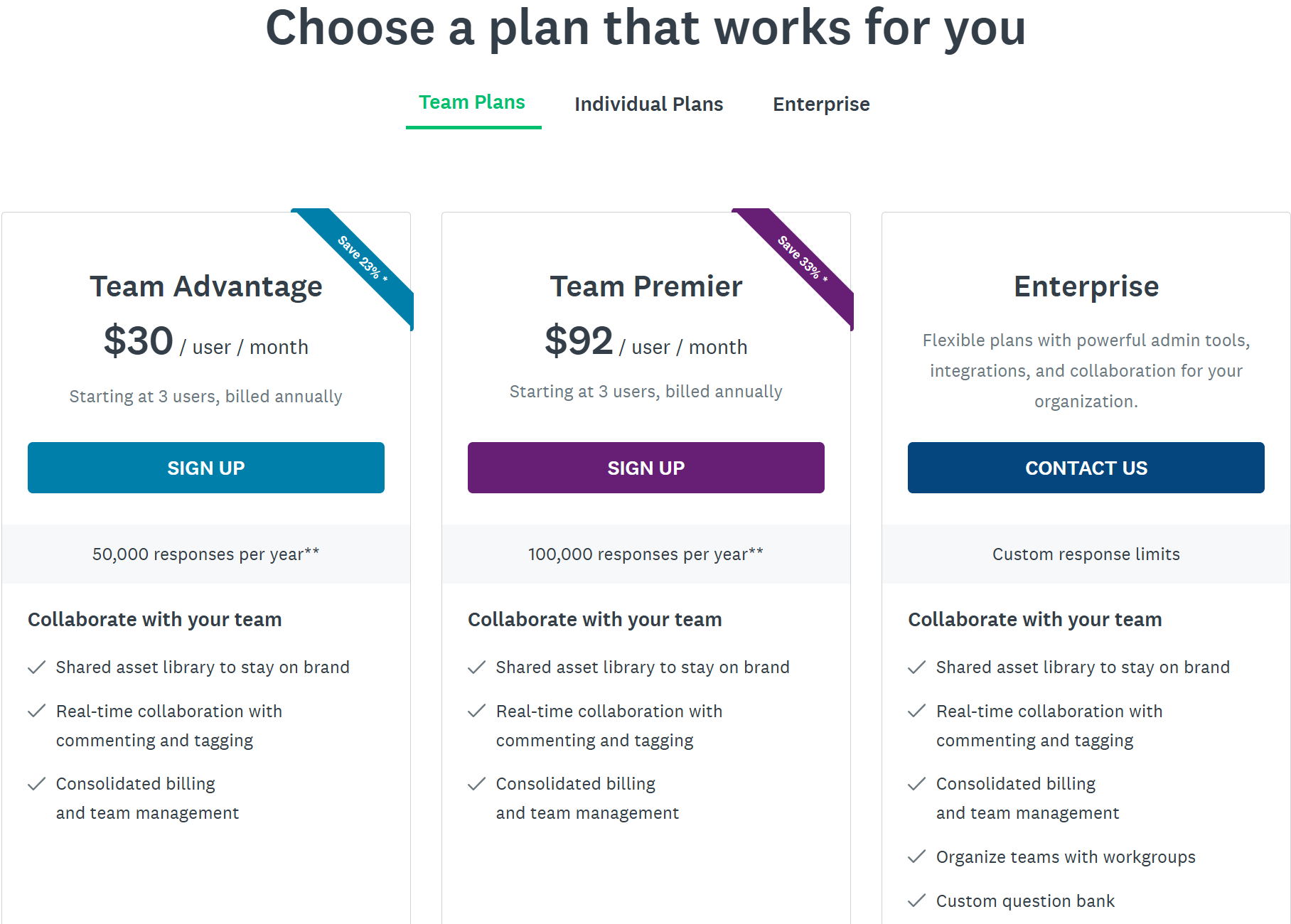
🕵️ Who Is SurveyMonkey in 2026?
Operating under its parent brand Momentive, SurveyMonkey controls roughly $750 million in annual revenue and dominates the self-serve survey market globally. Its strongest verticals are Nonprofit Organization Management (8% of its user base) and Higher Education (6%), with 37% small businesses, 38% mid-market, and 24% enterprise customers. Geographically, 60% of its user base is in the US, 9% in the UK, and 6% in Canada.
The revenue model is dual-channel: approximately 61% self-serve subscriptions and 39% sales-assisted enterprise contracts. Critically, 93% of paying users are locked into annual plans — a structural fact that makes SurveyMonkey’s business highly resistant to churn, even when customers are dissatisfied. The platform monetizes growth through seat additions, response overages, and compliance add-ons.
💸 The Pricing Trap: What SurveyMonkey Actually Costs
SurveyMonkey’s pricing table looks reasonable at first glance. The pain arrives when your team grows, your surveys go viral, or you need enterprise-grade compliance. Here’s exactly what you’re signing up for:
Published Plan Tiers (Billed Annually)
| Plan | Price | Seats | Responses/Year |
|---|---|---|---|
| Individual Advantage | $39/mo ($468/yr) | 1 | 15,000 |
| Team Advantage | $30/user/mo (min 3 = $1,080/yr) | 3+ | 50,000 |
| Team Premier | ~$75/user/mo (min 3 = ~$2,700/yr) | 3+ | 100,000 |
| Enterprise | $15,000–$30,000/yr | Custom | Custom |
Documented Overage Charges — The Silent Budget Killer
- Team Advantage plan exceeded by 10,000 responses → $1,500 surprise charge
- Team Premier exceeded by 20,000 responses → $3,000 surprise charge
- Single viral survey with 5,000 unexpected responses → $750 unplanned charge
Hidden Lock-In Clauses
- Adding users beyond the 3-seat minimum costs $360–$1,104/user/year
- HIPAA, GDPR, SSO, and PCI DSS compliance require a jump from ~$1,080/yr to $15,000–$30,000/yr (Enterprise only)
- API access beyond 500 daily calls: custom pricing, Enterprise tier only
- SMS surveys and offline mode: paid add-ons at Enterprise tier only
- 93% of paying customers are on annual-only contracts — no monthly flexibility
As our forensic teardown of survey platform pricing architectures confirmed, SurveyMonkey’s billing model follows a deliberate pattern: draw users in with a reasonable base price, lock them into annual contracts, then monetize their success through automated overage billing with no approval step and no ceiling.
🔥 Real Teams. Real Waste. Documented Evidence.
These are not hypothetical scenarios. Here are three documented cases of teams getting burned by SurveyMonkey’s pricing structure:
A student ran a survey on SurveyMonkey’s free tier, collected 50 responses, and was then hit with a $408 charge just to access the results. Their post: “I thought SurveyMonkey was free so I made the account and got 50 responses…but now they want to charge me $408 just to access the results.” The free tier collects your data — then locks it behind a paywall. Source: reddit.com/r/askTO
A business owner discovered that any meaningful survey functionality — logic, branding, cross-tabulation — requires a minimum $1,100/year commitment with no monthly option. Their post: “We tried using SurveyMonkey and all key survey features are pay-blocked up to $1100! There isn’t even a reasonable month price.” Source: reddit.com/r/Entrepreneur
Customer support teams that send a post-ticket survey routinely exhaust their 50,000 annual response allotment in just 8 months. The result: $1,500+ in overage charges that add 125% to the base plan cost. SurveyKing documents this as the #1 cited reason customers switch — a combination of surprise billing and unresponsive support. Source: SurveyKing Blog
📊 SurveyMonkey Pain Score Assessment
🆚 7 Verified SurveyMonkey Alternatives (2026)
Each alternative below was evaluated on pricing transparency, response limits, compliance access, and best-fit use case. All pricing is current as of Q1 2026.
| Name | Pricing Start | Key Strength vs SurveyMonkey | Key Weakness | Best For |
|---|---|---|---|---|
| Typeform | $25/mo (annual) | Superior conversational UX, higher completion rates | 100 responses/mo on base paid plan; gets expensive fast | Brand-conscious teams, lead gen |
| Jotform | $34/mo (annual) | 10,000+ templates, HIPAA at $99/mo, 50% nonprofit discount | UI feels dated; advanced features buried | Nonprofits, SMBs, payment-collecting forms |
| Google Forms | Free (with Workspace) | Unlimited responses, zero cost, native Google Sheets sync | No branding, minimal logic, no analytics depth | Budget-constrained or internal teams |
| Qualtrics | ~$1,500+/yr (custom) | Academic-grade logic, statistical analysis, enterprise CX | Overkill and over-budget for SMBs | Enterprise research, CX programs |
| Tally | Free; $29/mo paid | Unlimited responses on free plan, clean design | Limited reporting, newer product | Startups, freelancers, lightweight use |
| SurveySparrow | $79/mo (Business) | No overage model, recurring/chat surveys, 50K responses included | Fewer third-party integrations | CX teams, recurring NPS programs |
| QuestionPro | $99/user/mo (annual) | Advanced analytics, cross-tabs, 4.8/5 Capterra rating | Price per user is steep for large teams | Research-focused, data-heavy teams |
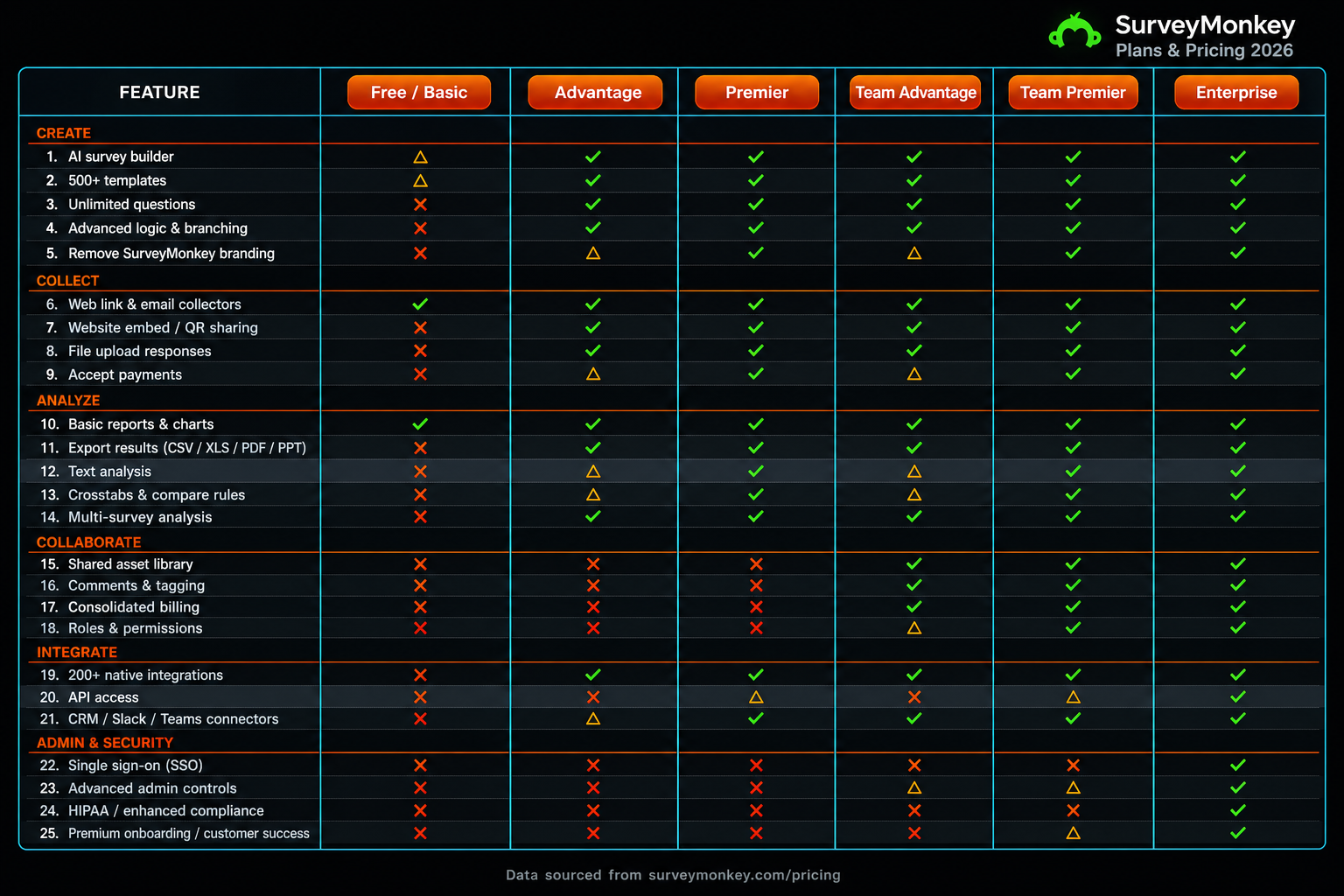
🧬 Feature Gap Matrix: SurveyMonkey vs Top 3 Alternatives
The matrix below scores SurveyMonkey against Typeform, Jotform, and Tally on 10 mission-critical features. Note the pattern: SurveyMonkey leads on analytics and panel access, but trails on pricing fairness, compliance affordability, and free-tier usability.
| Feature | SurveyMonkey | Typeform | Jotform | Tally |
|---|---|---|---|---|
| Conditional Logic / Branching | ✓ Full | ✓ Full | ✓ Full | △ Partial |
| Response Overage-Free Pricing | ✗ Missing | ✗ Missing | ✓ Full | ✓ Full |
| HIPAA Compliance (affordable tier) | ✗ Missing (Enterprise only) | ✗ Missing | ✓ Full ($99/mo) | ✗ Missing |
| Conversational / Chat-style UX | ✗ Missing | ✓ Full | △ Partial | △ Partial |
| Payment Collection in Forms | △ Partial (Enterprise) | ✗ Missing | ✓ Full | ✗ Missing |
| Unlimited Responses on Free Plan | ✗ Missing | ✗ Missing | ✗ Missing | ✓ Full |
| Advanced Analytics / Cross-tabs | ✓ Full | △ Partial | △ Partial | ✗ Missing |
| Respondent Panel / Audience Access | ✓ Full (335M+) | ✗ Missing | ✗ Missing | ✗ Missing |
| White-label / Custom Branding | △ Partial (paid tiers) | ✓ Full | ✓ Full | △ Partial |
| Offline Survey Mode | △ Partial (Enterprise add-on) | ✗ Missing | ✓ Full | ✗ Missing |
⚙️ Switching Costs: What It Actually Takes to Leave
This is where SurveyMonkey’s moat becomes visible. The switching costs are not catastrophic — but they are real, and teams should budget time and labor for each phase.
1 Data Migration Effort — HIGH
There is no bulk export option. A user with 10 years and 300+ surveys must download each individually. SurveyMonkey’s CSV/Excel exports use a non-standard multi-header format requiring cleanup scripts before they work with BI tools like Tableau or Power BI. Only Jotform offers an automated import of SurveyMonkey surveys via direct URL — a significant advantage if migration speed matters.
2 Learning Curve — LOW to MEDIUM
Most alternatives — Typeform, Jotform, and Tally in particular — offer similar or simpler UIs. Individual users typically ramp in 1–2 weeks. Team-wide standardization across templates and shared workflows takes 2–4 weeks, primarily due to rebuilding institutional survey templates and aligning on new naming conventions.
3 Integration Rebuilding — MEDIUM
SurveyMonkey connects natively or via Zapier to Salesforce, HubSpot, Slack, and Mailchimp. Most alternatives replicate this through Zapier, though Qualtrics offers deep native Salesforce integration. Budget 1–3 days of dev/ops time per critical integration — particularly if you’ve built custom webhook flows or API automation.
4 Full Migration Timeline
- SMB teams (3–25 users): 4–8 weeks — audit → export → rebuild → retest → go-live
- Enterprise teams with API dependencies: 2–4 months — includes dashboard rebuilding, SSO migration, and IT sign-off
🏆 Our Top 3 Picks for 2026
🥇 #1 — Jotform: Best All-Rounder
Jotform delivers the most complete SurveyMonkey replacement for the widest range of teams. HIPAA compliance at $99/month (vs. SurveyMonkey’s $15,000+ Enterprise tier), 10,000+ templates, native payment collection, offline survey mode, and a 50% nonprofit discount make it the default recommendation for any SMB, nonprofit, or healthcare-adjacent team. The only caveat: the UI requires some navigation to uncover advanced features.
🥈 #2 — Tally: Best Free Tier (No Catch)
Tally’s free plan includes unlimited responses — a direct inversion of SurveyMonkey’s paywall model. The paid plan starts at $29/month with no overage charges. For startups, freelancers, or any team that doesn’t need deep analytics, Tally eliminates the entire billing risk that makes SurveyMonkey so costly to operate at scale.
🥉 #3 — SurveySparrow: Best for Recurring NPS & CX Teams
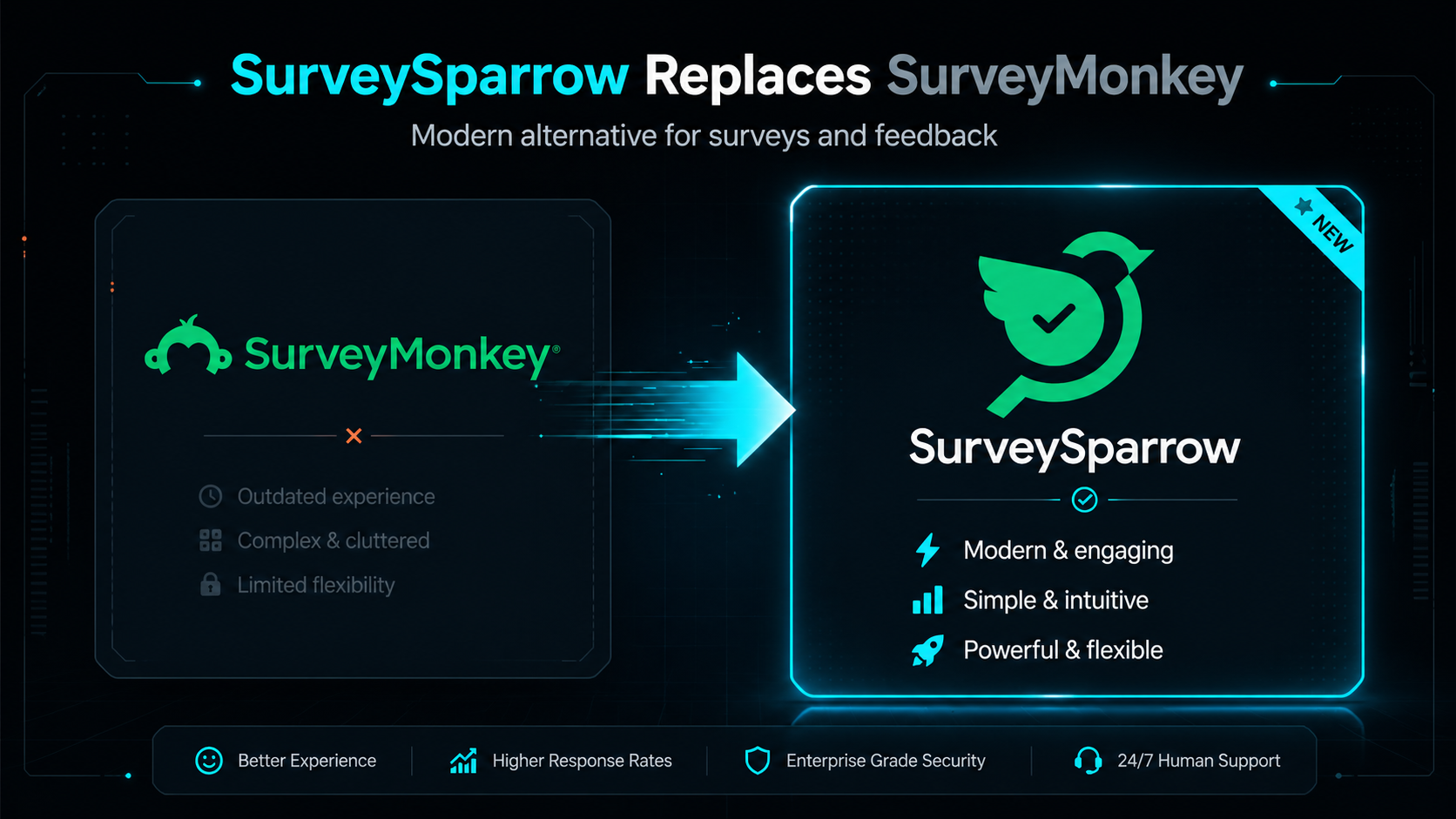
SurveySparrow is purpose-built for teams running continuous feedback loops — post-ticket surveys, recurring NPS programs, and chat-style pulse surveys. Critically, it uses a no-overage model: 50,000 responses included at the Business tier with no surprise billing. For customer support or CX teams that burned through SurveyMonkey’s limits in 8 months, SurveySparrow is the structurally safer choice.
🧾 Final Verdict: Who This Battle Report Is For
If your team uses SurveyMonkey’s respondent panel, runs multi-variable statistical research, or is deeply integrated into a Salesforce-driven enterprise CX stack — SurveyMonkey may genuinely be the right tool. Its analytics depth and panel access are category-leading and difficult to replicate at mid-market pricing.
For everyone else, the math is hard to ignore. The overage model auto-bills without approval. Compliance features are gated behind contracts that cost 10–28x the base plan. Data portability is deliberately limited. And 93% of customers are on annual contracts with no monthly escape hatch.
The three teams most likely to overpay on SurveyMonkey are: (1) Customer support teams with high-volume post-ticket surveys, (2) Growing SMBs hitting response limits as their audience scales, and (3) Healthcare or finance teams who discover HIPAA compliance requires a full Enterprise contract. If you recognize your team in any of these profiles, this is the report you needed.
The billing tactics documented in this report — auto-billed overages, compliance paywalls, no-warning charges — follow a pattern we’ve seen across the survey platform category. Our forensic teardown goes deeper on the contractual architecture, cancellation policies, and hidden billing clauses that survive even after you stop using the product.
🔍 Read the Full Forensic Teardown: Hidden Costs & Cancellation TrapsReady to Evaluate Your Options?
Use this report as your shortlist. Audit your current SurveyMonkey response usage, identify whether you’re at risk of overage charges, and benchmark against the alternatives above. The migration effort is real — but so is the savings for most teams.
→ Review SurveyMonkey’s Current PlansDebunkTheAI Battle Report · SurveyMonkey vs Alternatives · Last updated April 2026 · Research based on 40+ hours of pricing analysis, Reddit community evidence, and third-party review platform data. Pricing figures subject to change — verify directly with vendors before purchasing.